CAN
| Board | Renesas name | Linux | SOM Carrier Board |
|---|---|---|---|
| RZ/G3E SOM | CANFD1 CANFD5 | can0 can1 | CAN-A CAN-B |
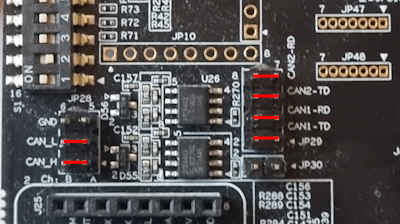
The SOM Carrier Board has two CAN transcievers available on connector JP28 (CAN-A on pins 1/3/5 and CAN-B on 2/4/6). To use the two CAN busses a couple of jumper cables must be used:
| CAN Bus | Pin | Connect |
|---|---|---|
| 1 | CAN1_TD | Connect JP29-1 to JP29-2 |
| 1 | CAN1_RD | Connect JP29-3 to JP29-4 |
| 5 | CAN2_TD | Connect JP29-5 to JP29-6 |
| 5 | CAN2_RD | Connect JP29-7 to JP29-8 |
In order to run the example code below, the two CAN busses must also be connected to each other like this:
| Pin | Connect |
|---|---|
| CAN-A_H to CAN-B_H | Connect JP28-1 to JP28-2 |
| CAN-A_L to CAN-B_L | Connect JP28-3 to JP28-4 |
This image shows all six connections:
U-Boot
CAN currently not supported.
Linux
Make sure that both can0 and can1 are detected.
ip link show
...
3: can0: <NOARP,ECHO> mtu 72 qdisc noop state DOWN mode DEFAULT group default qlen 10
    link/can
4: can1: <NOARP,ECHO> mtu 72 qdisc noop state DOWN mode DEFAULT group default qlen 10
    link/can
...
If the text <NOARP,ECHO> appears then the interface is down and must be brought up before it can be used.
ip link set can0 type can bitrate 500000 dbitrate 2000000 fd on
ip link set can0 up
ip link set can1 type can bitrate 500000 dbitrate 2000000 fd on
ip link set can1 up
As the interfaces are now up, the status will have changed.
ip link show
...
3: can0: <NOARP,UP,LOWER_UP,ECHO> mtu 72 qdisc pfifo_fast state UP mode DEFAULT group default qlen 10
    link/can
4: can1: <NOARP,UP,LOWER_UP,ECHO> mtu 72 qdisc pfifo_fast state UP mode DEFAULT group default qlen 10
    link/can
...
To test the CAN bus the two interfaces must be connected together as shown above.
The following example listens on can1 and sends on can0. Start by listening on the can1 interface in the background.
candump can1 &
Now send a message on can0 and see what arrives on can1.
cansend can0 5A1#11.2233.44556677.88
can1 5A1 [8] 11 22 33 44 55 66 77 88
The second line above is from the candump process and it shows that it has detected an 8 byte message with id 5A1 being received by the can1 interface.
After completing the tests, terminate the background process with the fg command and Ctrl+C.
fg
candump can1
^C