UART
The SOM Carrier Board has onboard USB to serial IC. The default position of the jumpers and the settings in both Linux and the U-Boot have been made so that the console always ends up on UART-A.
| Board | Renesas name | Linux | Carrier board |
|---|---|---|---|
| RZ/G3E SOM | SCIF SCI2 SCI7 | /dev/ttySC0 (console) /dev/ttySC1 /dev/ttySC7 | UART-A UART-B UART-C |
UART-A is available via a UART-to-USB bridge on micro-USB connector J6.
UART-B is either available on the Mikrobus/Click interface or on the M.2-E interface where it typically is used for Bluetooth on a inserted m.2 Wi-Fi module. To select between the two interfaces, use the S1 slider switch.
UART-C is available via a UART-to-USB bridge on micro-USB connector J7.
U-Boot
No special tests to run in the U-Boot. The console gets tested automatically and the other UARTs are not available.
Linux
To see which UARTs are available.
ls /dev/ttySC*
/dev/ttySC0 /dev/ttySC1 /dev/ttySC2
UART-A, /dev/ttySC0
The console uses /dev/ttySC0, so it does not need further testing.
UART-B, /dev/ttySC1
To test /dev/ttySC1 is a bit more involved as there is no usb connector to plug in to.
Instead we need a male-to-male jumper cable to connect the RX and TX pins in the mikroe socket on the SOM Carrier Board:
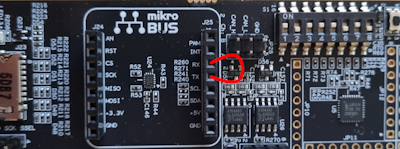
The S1 slider switch must be configured to direct the UART signals to the mikroe socket. To do this move slider 3 to the OFF position.
After making the connections, configure the UART with a baud rate of 115200, raw mode and no echoing.
stty -F /dev/ttySC2 115200 raw -echo
Now, listen for incoming traffic in the background and then write to the UART. The text that you send (in this example "Hello World") will be printed in the terminal as well.
cat /dev/ttySC1 &
echo Hello World > /dev/ttySC2
UART-C, /dev/ttySC2
To test /dev/ttySC2, use a micro-USB cable to connect J7 to a PC and open up the COM port in a terminal program like TeraTerm. Use 115200 8N1.
After connecting on the PC side, configure target with a baud rate of 115200, raw mode and no echoing.
stty -F /dev/ttySC2 115200 raw -echo
To listen on /dev/ttySC2 :
cat /dev/ttySC1 &
Type in TeraTerm on the PC and the text should appear in the terminal on the target. The RED LED next to J6 will blink as data is received.
To send to the PC:
echo Hello World > /dev/ttySC2
The "Hello World" text should appear in TeraTerm on the PC. The GREEN LED next to J6 will blink as data is sent.